
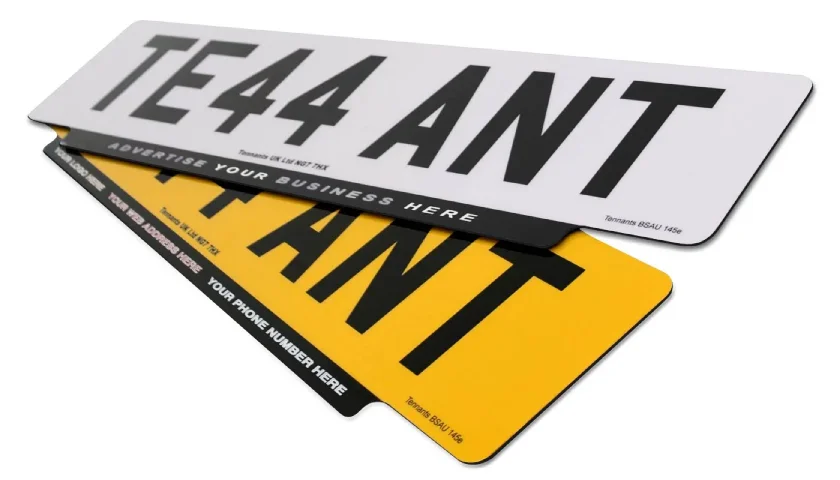
Number Plate Solutions for Dealerships, Motor Factors & the Aftermarket
For more than 50 years we have provided the automotive industry with cost-effective ways to produce number plates. From on-site Printing Systems, which include standards compliant Software, components & record keeping. To our on-demand Made Up Plates service, with online ordering and next-day despatch.
So no matter how many Dealerships, Garages or Part-Stores you operate, we’ll help simplify your supply & cut costs. Thanks to solutions that are perfect for any busy pre-sales team or parts workshop. Additional services include technical-support agreements, restocking options and online oversight of your plate production.
Use the boxes below to take a look at the answers we offer. Or read-on to see how we supply & support our clients.
Innovative and Reliable Number Plate Services
Designed to deliver every time.
At Tennants we’re experts in delivering solutions and services that are perfect for supplying number plates. Tried and tested, they offer a simple choice between printing them yourself or having them made for you.
Which Solution is Right?
Our Printing Solutions offer you answers to on-site number plate production. With systems you can tailor to fit your business needs and budget. In brief, our specialist equipment & software help you to meet British Standards. While we support you with guides, technical assistance and a reliable supply of components.
Alternatively we have Made Up Plates, an easier way to supply number plates. Here you sign-up to the service and place orders on demand. Then we make and deliver them to locations you choose. This saves you on equipment outlay and running costs. Yet you still need to register with the DVLA & keep records.
Number Plate Printing
We consider our range of number plate printing systems as tiered business solutions. After all we cover single site production, all the way up to centrally controlled hubs serving multiple branches.
Each one is aimed at a particular sector and is designed to provide everything you need. And still deliver low operating costs and greater profit, thanks to our modern devices and support.
Made Up Plates
Our made up plates service allows you to supply ready made number plates on demand. Despite you not owning specialist printers or even having to make & dispatch them.
Once you sign-up, you can place orders anytime you want. Request single, pairs or even bulk plates with delivery locations you choose. Furthermore your own company details are put on every one.
Professional Account Management & Support
Account Management
No matter which solution you choose, our support team delivers a first class service. From helping you pick and tailor a solution to meet your needs. To processing your orders for blank components and Made Up Plates. And we provide assistance with your production problems or stocking issues. For low-volume clients our NP-Shop allows you to buy small packs of components & order 24/7. In addition to online ordering it provides reduced prices & pre-set bundles for easy compliancy.
In order to deliver our services we have a team of account managers, engineers & customer service professionals. All members of the team are fully trained in our solutions and happy to guide and support your plate production.
Technical Support
To ensure your number plate printing system performs correctly, we provide remote & on-site support. This starts with on-site installation and training for our software and printers. Including plate assembly, which means making number plates using our jig and rollers.
After installation, we offer self-help user guides and online Knowledge Base articles. There you’ll find overviews & guides to all our number plate printers, software and record logs. So you can fix simple issues yourself and reduce any production downtime. For more complex technical problems, we have online Remote Assistance via Go To Assist. Or SLA allowing, you can request an on-site engineer visit, for more critical problems.
Finally, we carry out periodic follow-up visits for maintenance and to check on things. Because our technical team may have updates or bug fixes for your software. Or so your account manager can confirm your systems suitability.
Recycling Service
We also offer a recycling service where we collect your old number plates. And send them for cleaning and processing into their raw materials. This creates a sustainable, closed loop that prevents them from ending up in landfill. Although this service is free of charge, only larger number plate printing partners are eligible. Terms & conditions apply – Recycling Service Flyer.
Note: On-site support visits and recycling services may be subject to your Service Level Agreement.
Tested & Certified to British Standards
British Standard Number Plates
We always follow best practices and industry standards to deliver our solutions. In fact we operate with one aim, to provide number plates, systems and components compliant with current British Standards 145e. While following all regulations for manufacturers & providers.
To deliver this goal, we carry out in-house testing on our number plates & components. And we submit samples for official third-party accreditation and certification. Only then do we make our 3 constructions, Film, 3-Part & Reflective, available for purchase. Alongside our testing regime, we are members of the BNMA and contribute to technical advisory groups. All of this, while working with our customers and the DVLA to ensure legal compliance.
2024 BSAU 145e Accreditations
Film Plates CertificateAcrylic Plates Certificate3D Plates Certificate
Modern Number Plate Supply with Compliance & Flexibility Built-In
Want a number plates solution & supply that suits your sector and is standards compliant? Not to mention being cost-effective and offer accountability & oversight. If so, get in touch and find out how we can help you achieve this and still save.
For more information on our solutions, check out our number plate pages. Otherwise call us on 01159738084 or email sales@tennantsuk.com. Alternately fill in our quick Contact-Form with your name & enquiry details.